
How to Check Traffic Challan Online in Punjab
Check traffic challan online in Punjab in minutes. Follow 7 official steps to verify e-challan details, fines and payment options through PSCA and ePay Punjab.

By News Desk · Verified Pakistan News Desk
Published · 7 min read
Want to check traffic challan online in Punjab without visiting a traffic police office? The process is fairly simple. Punjab’s digital traffic system allows vehicle owners to look up e-challans and check whether a traffic fine is outstanding.
The Punjab Safe Cities Authority (PSCA) operates an electronic challan system that uses traffic-monitoring technology to detect certain violations and issue e-challans. The authority also provides an online challan verification facility.
Here’s how you can check your challan and what information you’ll need.
What Is a Traffic E-Challan in Punjab?
An e-challan is an electronic traffic ticket issued when a traffic violation is recorded through the relevant traffic enforcement system.
According to PSCA, its traffic management setup can detect violations such as red-light violations, wrong-lane or wrong-turn violations, one-way violations, and line, lane or zebra-crossing violations.
Instead of waiting for a physical notice to arrive, motorists can use the online system to see whether an e-challan has been issued against their vehicle.
How to Check Traffic Challan Online in Punjab: 7 Steps
Checking an e-challan only takes a few steps.
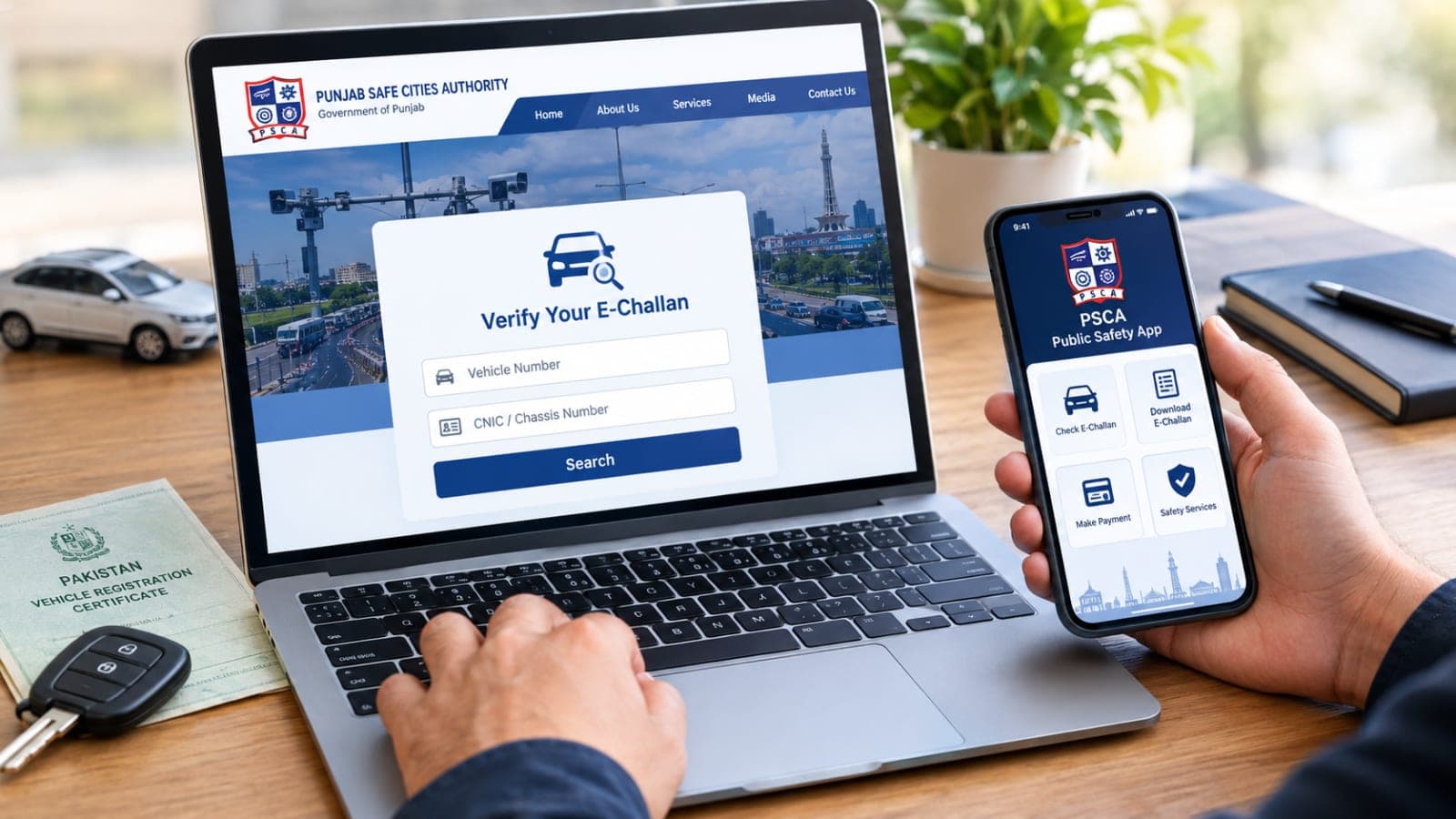
Step 1: Visit the official PSCA website
Open the official Punjab Safe Cities Authority website. Look for the “Verify Your E-Challan” or e-challan verification option.
PSCA's official website currently provides an e-challan verification service for motorists.
Step 2: Open the e-challan verification service
Select the challan verification option. Make sure you're using an official Punjab government service rather than entering your CNIC or vehicle details on an unknown third-party website.
Step 3: Enter your vehicle number
Type the registration number of the vehicle you want to check. Enter it carefully, as an incorrect registration number may prevent the correct record from appearing.
Step 4: Enter the required identification information
The official e-challan guidance states that users may search using the vehicle number along with the owner's CNIC or the vehicle's chassis number.
Step 5: Press the search button
After entering the requested information, select Search. The system will retrieve available valid e-challans associated with the submitted details.
Step 6: Check the challan information
If an e-challan is available, review the information shown on the screen. Check the vehicle details and payable amount before proceeding with a payment.
If nothing appears, double-check the vehicle registration and identification details you entered.
Step 7: Generate the challan or PSID for payment
For eligible e-challans, the official ePay Punjab guide explains that a user can select the relevant challan and generate a PSID (Payment Slip ID). That PSID can then be used through supported payment channels.
What Do You Need to Check an E-Challan?
Keep your vehicle information handy before starting.
You will generally need the vehicle registration number and either the vehicle owner's CNIC or vehicle chassis number, depending on the option provided by the official system.
It's a good idea to copy these details directly from your vehicle documents instead of typing them from memory.
How to Pay a Traffic Challan Online in Punjab
Finding a challan is only half the job. If there's an outstanding fine, you may also be able to pay it digitally.
Punjab's ePay system supports traffic-related government payments. Official guidance states that a generated PSID can be used through supported banking and payment channels.
The Punjab Information Technology Board has also documented payment options including internet banking, ATMs, over-the-counter banking and other digital channels for supported traffic challans.
You can visit the official ePay Punjab website to access the provincial electronic payment service.
Always check the amount and challan details before confirming a payment.
Can You Check an E-Challan From Your Mobile?
Yes. You don't necessarily need a computer.
PSCA says its Public Safety App allows users to check, download and manage e-challans from a smartphone.
That can be useful if you regularly drive and want an easier way to keep track of traffic-related records.
Can You Check a Punjab E-Challan Through SMS?
PSCA introduced an SMS facility that allows citizens to send a vehicle's chassis number to 8815 to receive information about outstanding e-challans and payable fines. The authority announced this service in 2021.
Because digital government services can change over time, the PSCA website or its current official channels should be your first choice if the SMS method doesn't return a response.
Why Is My Traffic Challan Not Showing Online?
Sometimes, a challan may not appear when you search for it. That doesn't always mean there is a problem with the system.
First, check the registration number, CNIC or chassis number you've entered. Even a small typing mistake can lead to the wrong search result.
It's also worth checking whether you're looking for the right type of challan. Punjab's Dastak service, for example, currently lists Traffic Challan and Safe City Challan as separate Punjab Police services.
When in doubt, use PSCA's official e-challan service or contact the relevant Punjab traffic authority rather than relying on an unofficial challan-checking website.
Common Traffic Violations That Can Lead to an E-Challan
Punjab's electronic traffic enforcement infrastructure covers several types of road violations.
PSCA specifically lists red-light or traffic-signal violations, wrong-lane and wrong-turn violations, one-way violations, and line, lane or zebra-crossing violations among violations detected through its Red Light Monitoring System.
Following lane markings and traffic signals isn't just about avoiding a fine. It also helps make busy roads safer and more predictable for everyone.
Is the Online Punjab Challan Check Free?
Checking your challan through the official verification service should not be confused with paying the actual fine.
Be cautious if an unknown website asks you to pay an unusual "verification fee" simply to search for your challan. For sensitive information such as your CNIC, vehicle registration or chassis number, stick to official Punjab government platforms.
Final Words
It's now much easier to check traffic challan online in Punjab than it used to be. Visit the official PSCA e-challan verification service, enter your vehicle and identification details, search for outstanding challans, and review the information shown.
If payment is required, follow the official PSID and ePay Punjab process rather than sending money through an unknown website.
For the latest information, use the Punjab Safe Cities Authority and ePay Punjab official platforms.
Frequently Asked Questions
How can I check my traffic challan online in Punjab?
Visit the official PSCA website and open its e-challan verification service. Enter your vehicle number and the requested CNIC or chassis information, then search for available challan records.
What information is required to check a Punjab e-challan?
The official ePay Punjab e-challan guide specifies the vehicle number along with the owner's CNIC or vehicle chassis number for the search process.
Can I pay my Punjab traffic challan online?
Supported challans can be paid digitally. The e-challan process can generate a PSID that is used through supported payment channels.
Can I check my e-challan using a mobile phone?
Yes. Apart from accessing web-based services through a mobile browser, PSCA says its Public Safety App includes features for checking, downloading and managing e-challans.
What is PSID in a traffic challan?
PSID is the payment identifier generated for an eligible challan. It is used to identify the payment when paying through supported banking or digital payment channels.
What happens next for national
We will keep this page updated as the story develops rather than publishing a near-duplicate at a new address. Follow National for related coverage.
Get the Verified Brief
One email each morning with the stories we checked overnight.
Spotted an error? Read our corrections policy and tell the newsroom.