

PPSC Admission Letter: 7 Easy Steps to Download by CNIC
Download your PPSC Admission Letter using CNIC in 7 easy steps. Check your exam date, roll number, test centre, and important instructions on the official portal.

By News Desk · Verified Pakistan News Desk
Published · 8 min read
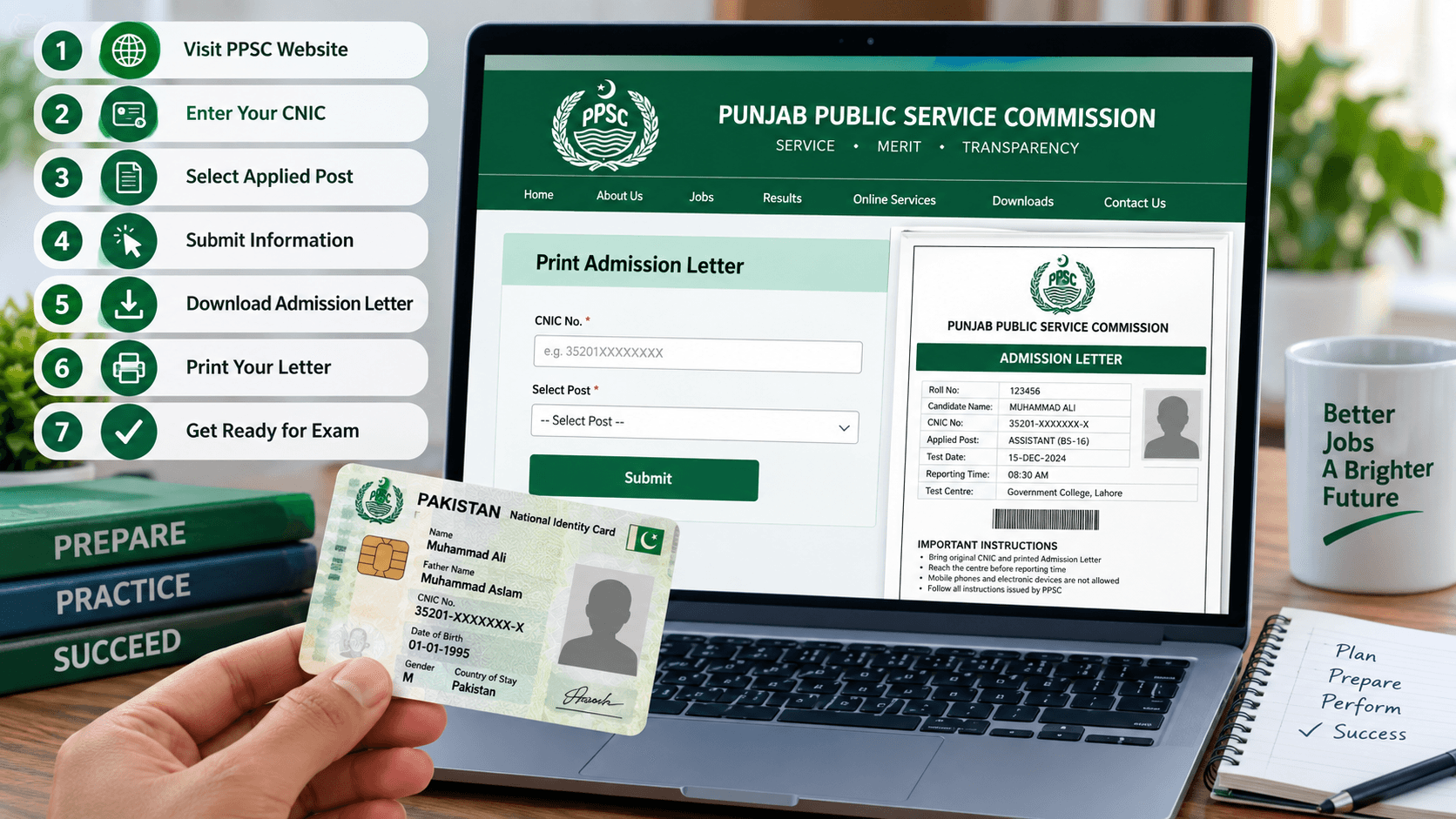
The PPSC Admission Letter is an important document for candidates preparing to appear in Punjab Public Service Commission examinations. If you've applied for a government job through PPSC, downloading your admission letter is one of the essential steps before your written test.
Fortunately, you don't need to visit a PPSC office to collect it. You can access your admission letter online using your Computerized National Identity Card (CNIC).
Whether you're appearing for a lecturer, assistant, junior clerk, or another government recruitment test, this guide explains how to download your PPSC Admission Letter, check your examination details, and prepare for test day.
What Is a PPSC Admission Letter?
A PPSC Admission Letter, commonly called a roll number slip, is a document issued by the Punjab Public Service Commission to candidates appearing in its recruitment examinations.
It provides important information about your examination, including your roll number, test date, reporting time, and examination centre.
The admission letter also contains instructions that candidates must follow during the examination.
Before leaving for your test, carefully read every detail printed on your admission letter. Even a small mistake about the examination venue or reporting time could cause unnecessary trouble.
Remember that receiving an admission letter doesn't automatically mean your eligibility has been fully verified. PPSC may examine your qualifications and supporting documents during later stages of recruitment.
How to Download Your PPSC Admission Letter Using CNIC in 7 Easy Steps
Downloading your PPSC Admission Letter is a straightforward process. All you need is an internet connection, your CNIC number, and the details of the post you applied for.
Follow these seven steps to access your admission letter without unnecessary delays.
Step 1: Visit the Official PPSC Website
Open Google Chrome or another internet browser on your mobile phone, laptop, or computer.
Visit the official Punjab Public Service Commission website:
https://www.ppsc.gop.pk/
Make sure you're using the official website rather than an unfamiliar third-party portal.
The PPSC website provides access to recruitment advertisements, examination schedules, results, and other information for candidates.
Step 2: Find the Print Admission Letter Option
Once the homepage opens, look for the online services section.
Find the option labelled "Print Admission Letter" and click on it.
This option takes you to the admission letter retrieval system, where candidates can access their examination documents.
If you're using a mobile phone, scroll through the homepage carefully to locate the relevant option.
Step 3: Enter Your CNIC Number
The next step is to enter your Computerized National Identity Card number.
Type your 13-digit CNIC number in the required field. Follow the format shown on the website, which may ask you to enter the number without dashes.
Double-check every digit before proceeding.
An incorrect CNIC number may prevent the system from finding your application or displaying your admission letter.
Step 4: Select Your Applied Post
After entering your CNIC number, select the government post for which you submitted your application.
For example, if you applied for a lecturer position, choose the relevant lecturer post from the available options.
If you've applied for more than one position, make sure you select the correct post and case number.
Choosing the wrong position may prevent you from accessing the admission letter you need.
Step 5: Submit Your Information
Once you've entered your CNIC number and selected the correct post, click the Submit button.
The system will process your information and search for your admission letter.
If your examination has been scheduled and your admission letter is available, the relevant document should appear on your screen.
If nothing appears, check your entered information and confirm whether PPSC has announced the examination schedule for your post.
Step 6: Download Your PPSC Admission Letter
When your admission letter appears, carefully review the information displayed on the screen.
Check your name, CNIC number, roll number, examination date, reporting time, and test centre.
If everything is correct, use the available download or print option to save your admission letter.
You can also save a PDF copy on your mobile phone or computer for future reference.
Keeping a digital copy is useful if you need to print the document again.
Step 7: Print Your Admission Letter
The final step is to print your PPSC Admission Letter.
Make sure the printed document is clear and readable. Your name, roll number, examination centre, and other important details should be visible.
Print every page of the admission letter, including any additional examination instructions.
Keep the printed copy in a safe place with your original CNIC so you can easily find both documents on examination day.
What Information Is Mentioned on the PPSC Admission Letter?
Your admission letter contains the essential details needed to identify you and guide you to the correct examination venue.
These details may include:
- Candidate's name and CNIC number
- Examination roll number
- Applied post and case number
- Written test date and reporting time
- Examination centre and venue address
- Important instructions for candidates
Read the complete document instead of checking only your examination date.
If you notice an error in your personal information or examination details, contact PPSC through its official communication channels before the test.
What to Do If Your PPSC Admission Letter Is Not Showing
Sometimes, candidates enter their CNIC number correctly but still cannot access their admission letter.
There may be several reasons for this problem.
First, confirm whether PPSC has officially announced the written test schedule for your applied post.
If the examination has not been scheduled or the admission letters have not been released, your document may not be available yet.
Next, check your CNIC number and selected post. A typing mistake or incorrect post selection can cause problems.
You should also try refreshing the webpage or opening it in another browser.
If the website is temporarily unavailable, wait a little while before trying again.
However, if your examination date is approaching and you still cannot access your admission letter, contact PPSC directly for assistance.
Important Instructions for PPSC Examination Day
Downloading your PPSC Admission Letter is only one part of preparing for your examination.
You must also follow the instructions provided by the Punjab Public Service Commission.
Bring your printed admission letter and original valid CNIC to the examination centre.
Check the reporting time mentioned on your admission letter and plan your journey accordingly.
If you're unfamiliar with the examination centre, locate its address before test day.
Avoid carrying prohibited electronic devices or other restricted items into the examination hall.
Most importantly, follow the instructions printed on your admission letter, as requirements may vary depending on the examination.
Can You Download a PPSC Admission Letter on Your Mobile Phone?
Yes, you can access your PPSC Admission Letter through a mobile browser.
Open the official PPSC website, select the admission letter option, enter your CNIC number, and choose your applied post.
Once your document appears, save it to your phone if the available options allow you to do so.
You can then print the saved document using a printer or visit a nearby printing shop.
However, keeping a PDF on your phone should not replace carrying the printed admission letter required for your examination.
Frequently Asked Questions
Can I download my PPSC Admission Letter using only my CNIC?
Your CNIC is the main identification detail used to retrieve your admission letter. However, you may also need to select your applied post or provide other information requested by the official portal.
Is the PPSC Admission Letter available before the examination date?
PPSC makes admission letters available according to its examination arrangements. Check the official website regularly for updates about your applied post.
What should I do if I lose my admission letter?
Visit the official PPSC website and try retrieving your admission letter again using your CNIC and applied post. Save another copy and print it before your examination.
Can I change my examination centre after downloading the admission letter?
Candidates should follow the examination centre assigned by PPSC. If you have a genuine concern about your assigned venue, contact the Commission directly for guidance.
Is the PPSC Admission Letter the same as a roll number slip?
Yes. Candidates commonly use the term roll number slip for the admission letter issued for PPSC written examinations.
Final Words
Downloading your PPSC Admission Letter using CNIC is a simple process when you follow the correct steps.
Visit the official PPSC website, select the admission letter option, enter your CNIC number, choose your applied post, and download your document when it becomes available.
Before examination day, verify your roll number, reporting time, test date, and examination centre.
Keep your printed admission letter and original CNIC ready, and follow all official examination instructions.
With these small preparations completed in advance, you can focus on what matters most: preparing for your PPSC examination.
Official Sources and Fact-Checking
Punjab Public Service Commission Official Website:
https://www.ppsc.gop.pk/
PPSC Examination Schedule and Official Announcements:
https://www.ppsc.gop.pk/
Candidates should verify their admission letter availability, examination schedule, venue details, and instructions directly through the official PPSC website.
What happens next for national
We will keep this page updated as the story develops rather than publishing a near-duplicate at a new address. Follow National for related coverage.
Get the Verified Brief
One email each morning with the stories we checked overnight.
Spotted an error? Read our corrections policy and tell the newsroom.